Forecast
The Forecast functionality allows you to glimpse projected values from the Attendance Plan Details (Carryover, Accrued, Taken, and Available) to make it easier to make informed decisions when requesting and approving leave.
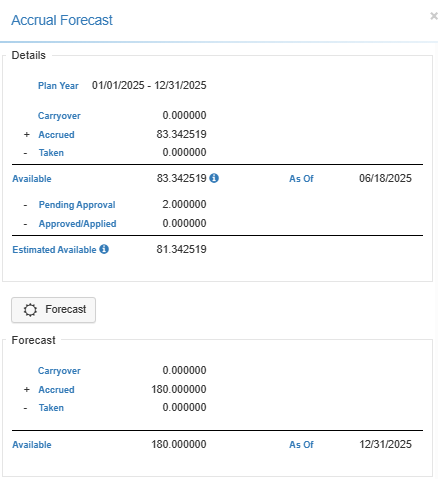
-
Forecast Availability
This ability to ‘Forecast’ an Employee’s accruals for an individual plan through a specific date is available both from the Employee Plans section of an Employee’s profile as well as from the Time Off Request area of LightWork. This would allow both Employees and Managers access to this helpful functionality. Forecast functionality will take into consideration any accrual Suspension Periods assigned to that Employee for that Plan Year and deduct accordingly. The Suspension Period indicator will display if Suspension Periods are impacting that Plan Year. -
Benefits of Using Forecast
Employees can plan their time off/vacation in advance without calculating their accruals manually to see if they will have enough time for the vacation and managers can confirm that the request that they’re approving complies with any organization rules regarding time off.
Note: LightWork also can be configured to warn users that the time off request being handled for submission or approval is for more time than is currently available. This can be configured in the Time Off Request Configuration Maintenance using the ‘Allow Requests When Time Off Not Available’ field. -
Running a Forecast
To run an accrual forecast, navigate into the Employee Plans section of the Employee Profile or click into a new or existing Time Off Request and select the plan you’d like to forecast for. Once inside the plan, you’d select the Forecast Button and enter the Process Through date you’d like to accrue through.